top of page
Teaching
Undergraduate
UCLA Design Media Arts
DMA24: Motion + Video
Winter 2024, Summer 2024, Winter 2026
Selected Student Work
Create a motion collage using various sources of found video footage and animation. You may also use original footage or animation you've created yourself as long as found media is sourced and incorporated. Assemble different pieces of video, animation images and media into an original composition. Consider the sources and the context of the media you are remixing and the new imagined context you are creating for them in your motion collage.
Selected Student Work Gallery:
SUTURE by Annie L.
"Taking apart the self in an obsessive mania to uncover bursting tumors and grotesque blemishes is at times how it feels to be the creator. There is no space for peace or happiness when you must lose yourself in the frenzy of your work. Here, this figure prepares to vivisect themselves in a grueling attempt to undergo a magnificent, almost masochistic metamorphosis. This is not their first time, but it is cruel yet exciting all the same."--Annie L.
Credits/Sources: Pixelated renders, personal photographs, Digital Collections - Natural Library of Medicine, Fallout terminal asset concept art, Stock images, Web Archive, vintage furniture listings
Reverie by Victoria O.
"Reverie is a dreamlike state while being awake. The song deals with themes of death and rebirth, delusion, religious trauma, and ideas of salvation. The video incorporates visual representations of these ideas, brought to life." -- Victoria O.
Song: Reverie by Victoria O.
Sources/Credits: Stock images + footage, original assets
UNTITLED by Chloe R.
"UNTITLED Secret is about the lives of two girls and the hidden desire that unravels them. It explores vampirism, societal constraints, and desire. I combined drawing with collage elements from photos by myself and from the internet, using repeated symbols and pictures to represent elements of the girls feelings. The compositions contrast close shots and cramped compositions with wide open landscapes, representing the freedom they desire."--Chloe R.
Sources/Credits: Original Assets, Wikimedia Commons, Newfound Recordings, TextureLabs, royalacademy.org, freesound.org
Create a narrative video using original footage that you shot yourself. Plan your narrative video by creating a storyboard and a shot list. You may also use found footage as long as original footage is also used. You may also create original animations instead of shooting video, or combine both. Assemble your original footage/animation into a video that tells a story. Incorporate audio and color grade your footage. You may incorporate VFX and found footage, and animation but this is optional.
Selected Student Work:
Away by Jason H. & Victoria O.
"Away is a short narrative film about a man taking a much needed break from his smart phone." --Jason H.
Lonely, but Not Alone by Guo C.
"The movie is filmed during valentine's day. The video blends romance and comedy within a horror-style format. Its title, Lonely, But Not Alone, captures the central theme. Although the girl experiences loneliness on Valentine’s Day, she is never truly by herself." --by Guo C.
so so sad... by Alina P.
"This one-minute animation follows a puppy who encounters a balloon dog and experiences the simple, immediate joy of a new friendship. Their connection forms quickly and without hesitation. They love each other. The puppy, unaware of its friend’s fragility, loves without calculation. In a moment of ordinary excitement, that love becomes too forceful. The balloon dog pops. The puppy is left so so sad... The destruction does not come from cruelty. It emerges from innocence and unmeasured affection. Through this brief encounter, the work reflects how harm can occur without intention, and how love, even when sincere, does not guarantee permanence. At the end, another dog approaches. This is not a replacement, nor a resolution. It is a continuation. The new presence suggests that connection remains possible even after rupture. Ultimately, the animation explores the risk embedded in affection. To love is to hold something that may not last. To reach again, after loss, is an act of courage." --Alina P.
Rot by Stella S.
"Rot explores the emotional experience of wasting a day in bed as a form of distraction or rest—one that ultimately fails to resolve the problems at hand. The narrative follows a girl trapped in a cycle of anxiety and depression, shifting between devices, apps, and snacks, as she becomes increasingly ensnared by the addictive and cyclical nature of social media. Parallel to this, the story contrasts her futile attempts to escape with moments of imagined freedom: dancing on a mountain, a vision of true liberation. These fleeting escapes, however, exist only in dreams and distractions like music, highlighting the inescapable grip of a technology-driven world. The video layers an overwhelming soundscape of social media notifications, TV chatter, microwave hums, repetitive thoughts, and music, evoking the overstimulation and chaos of an ADHD-like mental state. Through this visceral sensory experience, the project captures the tension between seeking solace and feeling trapped, reflecting the complex interplay of modern technology, mental health, and the search for genuine rest."--Stella C.
SPOONMAN by Sam A.
"This project was born out of a desire to have fun while exploring creative possibilities. Inspired by classic horror and thriller narratives, I developed a story that felt both exciting and evocative. Visually, I drew from early 20th-century noir films such as *The Killing* and *Nosferatu*, crafting a cinematic aesthetic that captures their mood and timeless intrigue. Through this process, I also used video editing as a tool to provoke emotion, experimenting with its power to shape the audience’s experience." --Sam A.
Create a music video using original footage that you shot yourself. You may also incorporate found footage as long as original footage is included. Assemble your footage into a video that is driven by the music, using rhythmic editing, pacing, and visual structure to complement and enhance the audio. Your video should respond directly to the song’s tempo, dynamics, mood, and structure. Visual changes should feel intentional and musically motivated. Narrative elements are optional, but the primary focus should be on editing in sync with the music and creating a cohesive audiovisual experience. You may incorporate color grading, effects, and VFX as appropriate to support the tone and rhythm of the track.
Selected Student Work Gallery:
空 by Vincent P.
"My first and last time trying animation."-- Vincent P.
Sources/Credits: Original footage + animation, Shutterstock footage, footage from the original music video for "空 by No Party for Cao Dong"
Song: 空 by No Party for Cao Dong
Know You by Haley L.
"Through this experimental film, I explore intrigue, specifically towards a person. The character, filmed of myself, portrays a distant individual you want to know more of: their speech (lips), perspective (eyes), movement (silhouette), and voice (musical vocalizations) fascinate you. Although the character is the viewer's main subject of interest, they also are in control, embodied through facial expressions and gestures that assert their self-confidence and fulfillment. I enjoy embodying this character in moments of romanticizing my life, which Suzanne Vega's song "Tom's Diner" compliments in its mystifying qualities." --Haley L.
Sources/Credits: Original Footage, Pexels stock footage
Song: Tom's Diner by Suzanne Vega
Everything is OK! (or is it...) by Samantha C.
"I worked with my brother EJ’s original song, Two Way Street, which delves into the struggles of a couple navigating unresolved conflicts and the absence of open communication. To reflect these themes, I created a surreal, imaginative, and playful concept. The couple lives in a utopian world, visualized through warm, pink-tinted color grading and vintage-inspired framing and textures. However, flashes of reality disrupt this facade: green-tinted color grading, darker lighting, lower frame rates, motion blur, and the confined setting of their apartment symbolize EJ’s memories surfacing and the true state of their relationship coming to light." --Samantha C.
Sources/Credits: Original Footage
Song: Two Way Street by EJ
OKAY by by Kaeden K. and Jason W.
"This music video is just a way to have fun whenever. It suppose to be like a 2000s rap film that is cringy, corny, and dumb. I want this video for people just to enjoy and just be themselves and enjoy the moment. I had a lot of fun making this video because not only was I planning this for awhile, we had a change of plans with Professor Lena being in the video which was really fun and she ate." -- Kaeden K. and Jason W.
Sources/Credits: Original Footage
Song: OK by Joey Valence & Brae
Syllabus
This course explores aesthetics and fundamentals of motion and its application to design and media arts through an introduction of the basic concepts and tools for the design of moving images. Class time will include class discussions, student presentations, critique, software tutorials and studio time for project development.
Motion is a project-based lab for developing skills in moving image design, animation and video focusing on Adobe After Effects, Premiere, and Photoshop. The course combines software training with critique-based seminars where students create and present self-directed work. It examines the language and history of moving design, exploring both industry-standard and experimental approaches. Through lectures, readings, screenings, discussions, and presentations, students will gain technical, critical, and creative tools, basic production and postproduction skills, and an understanding of key concepts in contemporary film, video, new media, installation, and animation.
Studio, six hours; outside study, six hours. Introduction and integration of traditional design tools, camera, and digital technologies for application to visual thinking and fundamentals of design.
Week 1
Class Introductions
Lecture: Introduction to Motion
Lecture: Remix, Appropriation, Collage, Copyright and Found Footage
Week 2
Tutorial: Intro to After Effects
Assign Project 1: Motion Collage
Studio Session: Class time to work on Project 1
Studio Session: Class time to work on Project 1
Week 3
Tutorial: Photoshop, Puppets, After Effects
Studio Session: Class time to work on Project 1
Week 4
Project 1 Due: Motion Collage
Class Critique: Share work with the class and give each other reactions and feedback
Week 5
Assign Project 2: Narrative Video
Lecture: Shotlists, Storyboards and Narrative Storytelling in Sequences
Studio Session: Class time to work on Project 2
Shootroom Training
Studio Session: Class time to work on Project 2
Week 6
Create storyboard/concept for Project 2
Tutorial: Premiere + After Effects
Lecture: Power of Narrative / Context
Lecture: DIY Equipment for Video
Studio Session: Class time to work on Project 2
Week 7
Studio Session: Class time to work on Project 2
Studio Session: Class time to work on Project 2
Week 8
Studio Session: Class time to work on Project 2
Project 2 Due: Narrative Video
Class Critique: Share work with the class and give each other reactions and feedback
Week 9
Assign Project 3: Music Video / Visualizer
Studio Session: Class time to work on Project 3
Lecture: Music Videos
Tutorial: Rhythmic Editing & Animation in After Effects
Studio Session: Class time to work on Project 3
Week 10
Studio Session: Class time to work on Project 3
Project 3 Due: Music Video / Visualizer
Class Critique: Share work with the class and give each other reactions and feedback
Insight
Perspective on motion and video design and media arts.
Establish Foundations
Understanding fundamental motion and video principles and aesthetics.
Develop Proficiency
Technical skills for producing motion and video projects using industry standard software and experimental approaches.
Professional Relevance
Knowledge of professional motion and video practices and production pipelines.
Find Your Voice
Develop a personal creative style and artistic vision through practice and experimentation.
Build a Portfolio
Complete three multi-week creative projects suitable for inclusion in a portfolio.
Assessment + Grading
Project 1 — 25%
Project 2 — 25%
Project 3 — 25%
Attendance & Participation — 25%
Participation
Participation constitutes:
• attending class
• participating in class discussions
• participating in critiques of your peers
Attendance
You are required to attend class unless you have an excused absence or have cleared it with the instructor.
If you wish to work from home on studio-session-only days where students are working on projects, email to notify the instructor. If you have questions while working on your project, you should attend class to receive in-person feedback and assistance.
Project Evaluation
Work will be evaluated on:
• understanding of class material
• effort and progress throughout development
• conceptual creativity
• aesthetic quality
• technical skill
Google Drive Account
Projects will be submitted using Google Forms and you will need a Google account to submit them.
Adobe Creative Suite
Log in with your UCLA credentials to access the free software available to you. We will use Photoshop, Premiere, and After Effects.
Lectures and Tutorials
All course material is uploaded to the course website so you can review it if you miss something.
DMA144: Type in Motion
Fall 2024, Fall 2025
Selected Student Work
Create a 15-30 second kinetic typography animation of any quote that is meaningful to you. Focus on creative typography treatments, well-timed animations, matching the message to the visual experience and timing. Sound and additional non text graphics are optional, not required.
NOTE: By meaningful I mean that the quote can be anything that is compelling to you. It doesn't have to be "deep" or "impactful". It can be silly, weird-- literally anything that resonates with you. You can also do a quote that is in any language. The "meaningfulness" comes in where your typographic design and motion choice emphasize the meaning, feeling or mood of the quote you choose.
Selected Student Work Gallery
Manifesto by Rachel L.
Break The Rules Like an Artist by Nicolas D.
Are Computers Alive? by Abby Y.
Produce a 45 second (minimum length, no maximum length) explainer video for a concept or information that exists in the real world. Use animated typography as the primary visual element. Incorporate icons, simple graphics, and audio. You can also found footage or stock footage or original video.
Examples of videos that would fulfill this assignment:
Tutorials (how to do something)
Explainer videos (like the kind of videos we see on Vox)
Documentary/news or historical information
Video essay (you explain your own perspective on a a real world topic)
Animated infographic (visually explain and portray statistics)
Public service announcement
Campaign video, persuasive videos
Fun facts
Convey a win or lose state in a game (for example, bowling animations in between turns)
Selected Student Work:
How to Create a Portfolio by Ella C.
No One Expects Hagfish Slime by Hera S.
Cats or Dogs by Sophia T.
What is Hearing People? by Yaozheng S.
Design and animate an opening title sequence for a film or TV show, or a lyric video for a song that is at least 60 seconds in length. Include original animations and graphics. Demonstrate rhythmic editing/syncing to music.
Can use an song (original or from another artist) OR a movie/TV show (if you have an original film that needs a title sequence you can do this as well)
Use animated typography as a main visual feature
Incorporate graphics to complement the typography and communicate the mood
Ensure a consistent visual style in typography and graphics
Make sure text is legible and conveys the titles/credits or lyrics clearly
Focus on syncing text and visuals to music
Selected Student Work Gallery:
world/insured by Vienna T.
Song: World/Insured by Alex G.
Taxes by Nicolas D.
Song: Taxes by Geese
You Can Have it All by August H.
Song: You Can Have it All by George McCrae, perfomed by Yo La Tengo
TV STARR by Sonny G.
Song: TV STARR by Wired Connection
Syllabus
Typographic vocabulary is expanded through the use of time-based composition, sound, and animation. The application of kinetic media enables motion, scale change, and sequence to typographic communication. By experiencing the rhythmic and expressive use of type in motion, investigation of varying type size, weight, spatial relationships, form and counter form, and movement within a word, while preserving typographic principles.
Students are exposed to a more interpretive use of typography, which can be applied to a variety of applications such as film and television titles, commercials, information kiosks, interactive signage, websites, and presentations. Letter grading.
Studio, six hours; outside study, nine hours. Requisites: courses 21, 22, 24, 25, 28, and 101 or 104.
Week 1
Class introductions
Lecture: Review typography foundations
Lecture: Kinetic typography
Tutorial: Intro to After Effects Text
Assign Project 1: Animated Quote
Week 2
Tutorial: After Effects and animating text
Studio session: class time to work on Project 1
Week 3
Project 1 due: Animated Quote
Class critique: share work with the class and give each other reactions and feedback
Assign Project 2: Explainer Video
Lecture: Communication with kinetic typography and moving image
Week 4
Tutorial: After Effects, moving image and text / animating vectors
Studio session: class time to work on Project 2
Studio session: class time to work on Project 2
Week 5
Studio session: class time to work on Project 2
Studio session: class time to work on Project 2
Week 6
Project 2 due: Explainer Video
Class critique: share work with the class and give each other reactions and feedback
Assign Project 3: Title Sequence or Lyric Video
Week 7
Lecture: Title sequences and lyric videos
Studio session: class time to work on Project 3
Tutorial: Rhythmic editing and animation in After Effects
Week 8
Studio session: class time to work on Project 3
Week 9
Project 3 due: Title Sequence or Lyric Video
Class critique: share work with the class and give each other reactions and feedback
Critique questions
Week 10
Finish critique
Make revisions to projects if needed
Insight
Perspective on motion as it relates to typography, design & media arts
Establish Foundations
Understanding of fundamental kinetic typography and motion principles and aesthetics
Develop Proficiency
Technical skills for producing kinetic typography projects using industry standard software and experimental approaches
Professional Relevance
Knowledge of professional typography and motion practices and production pipelines.
Find Your Voice
Develop a personal creative style and artistic vision through practice and experimentation.
Build a Portfolio
Complete three multi-week creative projects suitable for inclusion in a portfolio.
Assessment + Grading
Project 1 — 25%
Project 2 — 25%
Project 3 — 25%
Attendance & Participation — 25%
Participation
Participation constitutes:
• attending class
• participating in class discussions
• participating in critiques of your peers
Attendance
You are required to attend class unless you have an excused absence or have cleared it with the instructor.
If you wish to work from home on studio-session-only days where students are working on projects, email to notify the instructor. If you have questions while working on your project, you should attend class to receive in-person feedback and assistance.
Project Evaluation
Work will be evaluated on:
• understanding of class material
• effort and progress throughout development
• conceptual creativity
• aesthetic quality
• technical skill
Google Drive Account
Projects will be submitted using Google Forms and you will need a Google account to submit them.
Adobe Creative Suite
Log in with your UCLA credentials to access the free software available to you. We will use Photoshop, Premiere, and After Effects.
Lectures and Tutorials
All course material is uploaded to the course website so you can review it if you miss something.
Scripps College
MS131: Interactive Narrative Design
Winter 2023, Fall 2024
Selected Student Work
Create an original text-based interactive narrative web browser game using Twine, a free and open-source tool for creating non-linear, choice-based stories. Your game should demonstrate your understanding of interactive storytelling techniques, branching narratives, and player agency.
Selected Student Work Gallery:
The Moth Effect by Samuel W.
A game about the butterfly effect, time travel, and sports betting.
PLAY
Sky World by Viv H.
A narrative exploring how the virtual and real worlds impact people, focusing on hospitalized players facing serious mental health challenges.
PLAY
Tongue & Teeth by Perce A.
A story exploring a transgender vampire’s quest for gender-affirming care in a word where vampires possess regenerative abilities.
PLAY
Create an original character-driven, dialogue-focused interactive experience using Ren'py, a popular engine for developing visual novel games. Your project should showcase your ability to craft compelling characters, write engaging dialogue, and create meaningful player choices that affect character relationships and story outcomes. Create expressive visual UI design and character design. Add moments of gameplay that utilize environmental storytelling to advance the plot, where players interact with the game world.
Selected Student Work:
Bready Adventures: Rise of the Dough by Esther L.
A baker-turned-bread hero navigates an enchanted bakery to recover recipes and reclaim their humanity.
PLAY
Dragonfly Forest by Emma M.
Exploring human-nature connections as players face choices to transform into a tree, bridge worlds, or return home, reshaping perspectives.
PLAY
WIBSTR by Mia M.
Based on my experience as a clueless freshman at Harvey Mudd, this heartfelt, humorous game explores balancing college life, friendships, and personal growth.
PLAY
Syllabus
This course situates narrative writing as a key design practice for the creation of games and other interactive experiences. Learn how traditional narrative principles such as character, setting, and plot function within indeterminate and variable experiences that range from mainstream video game to tabletop role-playing and experimental digital/theatre works. Embark on creative writing and design projects that integrate narrative and algorithmic/rule-based play in digital and non-digital form.
Week 1
Introductions
Review syllabus
Read: The Problems with Videogames by Anna Anthropy - Excerpt from Rise of the Videogame Zinesters (2012)
Week 2
Lecture: Gamergate and the reactionary contemporary politics of accessible and independent solo game development
Watch: Anna Anthropy – We Have Voices Now
Read: Anna Anthropy and the Twine Revolution by Cara Ellison
Watch: An Argument for Game Artistry – Kellee Santiago
Read: Video Games Can Never Be Art by Roger Ebert
Lecture: Narrative structure
Lecture: Dramatic game dynamics
Read: Tools for Creating Dramatic Game Dynamics by Marc LeBlanc
Play: LION KILLER by Sisi Jiang, He Fucked the Girl Out of Me by Taylor McCue, Depression Quest by Zoe Quinn, Rocks Fall Everybody Cries by merritt k, Howling Dogs by Porpentine
Lecture: Meet the devs
Week 3
Assign Project 1: Text based game
Lecture: Dramatic game dynamics in Twine and text based games
Lecture: Branching narratives and interactivity
Tutorial: Intro to Twine
Week 4
Work on design document
Lecture: Remix, kitbashing, appropriation, collage, AI, copyright
Studio session: class time to work on Project 1
Week 5
Tutorial: Creating visuals with Piskel and Photoshop
Tutorial: Twine HTML and CSS, creating a score
Studio session: class time to work on Project 1
Week 6
Studio session: class time to work on Project 1
Week 7
Studio session: class time to work on Project 1
Week 8
Project 1 due: Text based game
Class critique: share work with the class and give each other reactions and feedback
Week 9
Class presentations: Everyone presents their project (approximately 5 minutes each), demonstrating a playthrough of their game and explaining the concept.
Lecture: Interactive narrative in games, visual novels and dating sims
Week 10
Lecture: Character design
Assign Project 2: Character and dialogue focused visual novel
Play: [Select at least 2 to play and discuss]
Free:
Doki Doki Literature Club by Dan Salvato
Miho Nakayama’s Tokimeki High School - NES
Phoenix Wright Ace Attorney
Tokimeki Memorial
Girl Friend Construction Set
The Portopia Serial Murder Case
Our Life Beginnings & Always
Alter Ego
Not free:
Hatoful Boyfriend (Windows Only)
VA-11 Hall-A: Cyberpunk Bartender Action
Ladykiller in a Bind by Christine Love
Dream Daddy by Game Grumps
Danganropa: Trigger Happy Havoc
Week 11
Brainstorm Project 2
Character design worksheet
Tutorial: Ren'py
Lecture: UI design
Studio session: class time to work on Project 2
Week 12
Lecture: UI design
Worksheet: assets list
Studio session: class time to work on Project 2
Week 13
Tutorial: Ren'py
Studio session: class time to work on Project 2
Lecture: Environmental storytelling
Play: [Select at least 2 to play and discuss]
Free:
Theresa Duncan's Games (Chop Suey, Smarty, or Zero Zero)
Jan Pienkowski's Haunted House
Hotel Dusk: Room 215
Not free:
Detention (Switch or computer)
Gone Home (Switch or computer)
Unpacking (Switch or computer)
Week 14
Peer playtesting
One on one feedback and help
Week 15
Project 2 due: Character, dialogue and environmental storytelling
Class critique: share work with the class and give each other reactions and feedback
Insight
Perspective on writing as it relates to game design and interactive narrative design.
Establish Foundations
Understanding of fundamental principles of interactive narrative design.
Develop Proficiency
Technical skills for producing Games in programs such as Photoshop, Twine, and Renpy.
Professional Relevance
Knowledge of professional web and game development practices and production pipelines.
Find Your Voice
Develop a personal creative style and artistic vision through practice and experimentation.
Build a Portfolio
Two multi-week creative projects that can be included in personal portfolios.
Participation
Participation: Participation will be a significant portion of your grade. Participation constitutes: showing up to class, being on time, completing assignments on time, participating in class discussions, participating in critiquing your peers, and asking questions.
Attendance: You are required to attend class unless you have an excused absence or have otherwise cleared it with me. Your attendance is factored in to your participation grade.
Projects: There are three assignments that students will have in-class studio time to work on. Specific details and expectations about the three assignments will be given in class.
The three assignments include:
Text Based Game
Point & Click Game
Attendance
You are required to attend class unless you have an excused absence or have cleared it with the instructor.
If you wish to work from home on studio-session-only days where students are working on projects, email to notify the instructor. If you have questions while working on your project, you should attend class to receive in-person feedback and assistance.
Project Evaluation
Work will be evaluated on:
• understanding of class material
• effort and progress throughout development
• conceptual creativity
• aesthetic quality
• technical skill
Grades will be determined with the following % breakdown:
Project 1 -- 35%
Project 2 -- 35%
Attendance & Participation -- 30%
Work will be evaluated on how well it demonstrates understanding of the class material, the effort and progress throughout the project development, conceptual creativity, aesthetic quality, and technical skills. Late projects and assignments without communication with the instructor will be penalized by one letter grade per day.
Headphones
So you can listen to audio and revisit tutorials during in class reading & work sessions.
Google Drive Account
You will be submitting your projects through this website using Google Forms, and will need a google account to submit your projects.
Adobe Creative Suite
You can get access to the Adobe Creative Suite through Scripps.
Neocities.org
Make an account on neocities.org to host images online for Twine.
Game Engines + Software
Twine 🦖 Ren'py 🦖 Piskel 🦖 ElevenLabs 🦖 Poseable Virtual Reference Doll🦖
Lectures + Tutorials
You never have to worry about missing something in class, all of the course material is uploaded onto the site and you can review it here.
High School
UCLA Game Lab Summer Institue
Character Animation [2020-2023, 2025]
Selected Student Work

Eyre by Katherine Z.
Eyre had a friend who died from a disease that the kingdom refused to treat. Eyre tried to revive her with magic, but instead created corrupt monster bugs. Eventually Eyre sacrificed an eye to bind their friend’s spirit to their soul gem, ensuring her safety but trapping her. Grief-stricken, Eyre decided to create more monsters to get revenge on the kingdom, but was defeated by the kingdom’s hero, and their soul gem was shattered. Eyre wakes up in a forest with no memories of their past, but with a spirit companion, Ri (who was released from the gem when it was shattered), urging them to travel the land and collect the shards of the gem to recover their memories and powers.
Elliot by Stacey X.
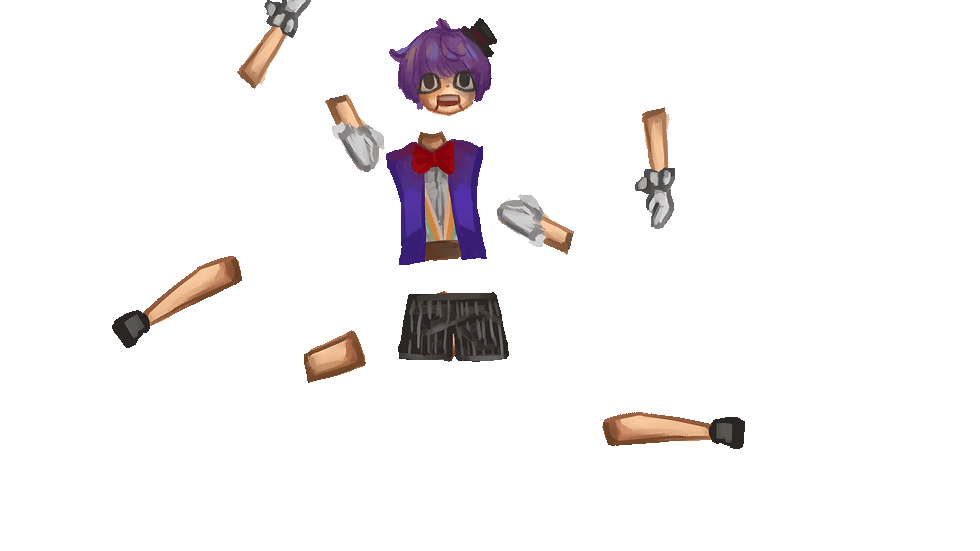
Eliot is a puppet who lives in his inventor's workshop. Because of the way his joints detach, he sees himself as a “broken puppet.” He hopes his inventor will come back soon to the workshop and fix him up--but until that day comes, he’s devoted every day of his life to keeping the workshop neat and orderly, and to vanquishing every threat that comes to this place.

Lysander by Isha D.
Lysander is a snarky, intelligent cat who thinks he's the best. He has a staff that is alive, and he calls it Caesar. Since he hates humans, Lysar retreated to the mountain forest to study and learn magic. No one knows how long he's been there. No one ever visits him, so to some people he's a myth.
Syllabus
In this course, students get a fundamental overview of character design and animation using Adobe Photoshop and After Effects. Students explore basic techniques for digital illustration, collage, character design, character rigging, and keyframe animation. By the end of the course, students create and animate their own original character and gain the skills to continue creating and animating characters independently.
Day 1
Introduction and first steps in character creation
Instructor and teaching assistant introduce themselves
Lecture introducing character design and animation
Create a sketch and a backstory for your character
Introduction to Photoshop and overview of tools used for character creation
Explore techniques for character creation including collage, digital line art, scanning and cleaning up hand drawn line art, and digital coloring
Due: A sketch of your character and a written backstory
Day 2
Refining and preparing your character for animation
Review Photoshop tutorial and learn how to save body parts of a character in layers suitable for animation
Create the character you sketched in Photoshop with animation ready layers
Due: Character finalized in Photoshop and ready to import into After Effects for animation
Day 3
Character animation preparation and rigging
Introduction to character animation tools in After Effects
Learn how to import character files from Photoshop, understand keyframes in animation, use 2D character rigging and puppeting techniques, and create looping animations or walk cycles
Begin animating your character in After Effects
Due: Character rigged in After Effects with some animation
Day 4
Character animation and exporting
Review After Effects tutorial and answer questions
Learn how to export animations as .mov and .gif files on transparent backgrounds
Studio time to complete animated character loops with help from the instructor and teaching assistant
If the character is finished, students may create an environment or scene for the character
Due: A first draft character looping animation exported as .mov and .gif on a transparent background.
Day 5
Studio time and final export
Studio time to complete animated character loops and receive help from instructor and teaching assistant
Course evaluations
Due: A final character looping animation exported as .mov and .gif on a transparent background. A finalized written backstory for your character.
Students develop understanding of character design fundamentals including:
A familiarity with Adobe Photoshop and After Effects
The ability to design and illustrate 2D characters digitally
A basic understanding of character design techniques
The ability to rig and animate a character for a looping animation
An understanding of principles of animation to convey expressive and compelling characters
The ability to export 2D animations in formats suitable for sharing online and importing into game engines such as Unity
Adobe Photoshop and After Effects
Drawing paper (must be unlined, computer paper is acceptable)
Pen and pencil
A scanner or scanner app such as Scannable or CamScanner (a smartphone camera can also be used)
Optional/Recommended:
Micron pens
A Wacom drawing tablet
Character design checklist and character information sheet
After Effects tutorials
12 Principles of Animation
Eadweard Muybridge motion studies
BaM Animation YouTube channel
Check out the student work gallery for the UCLA Game Lab Summer Institute!
bottom of page